One new word per sentence. That is the whole method.
You already know more English words than you can use. What stops you is meeting them cold. Lexi hands you one short sentence at a time in which everything is familiar except one word — so the meaning arrives before the definition does, and the word has somewhere to stick.
iPhone, iPad, Mac and Apple Vision Pro · free to use · reads offline · no account to create
1new word per sentence
IPAon any word you tap
0accounts to create
Offlinethe library is on your phone
What it looks like
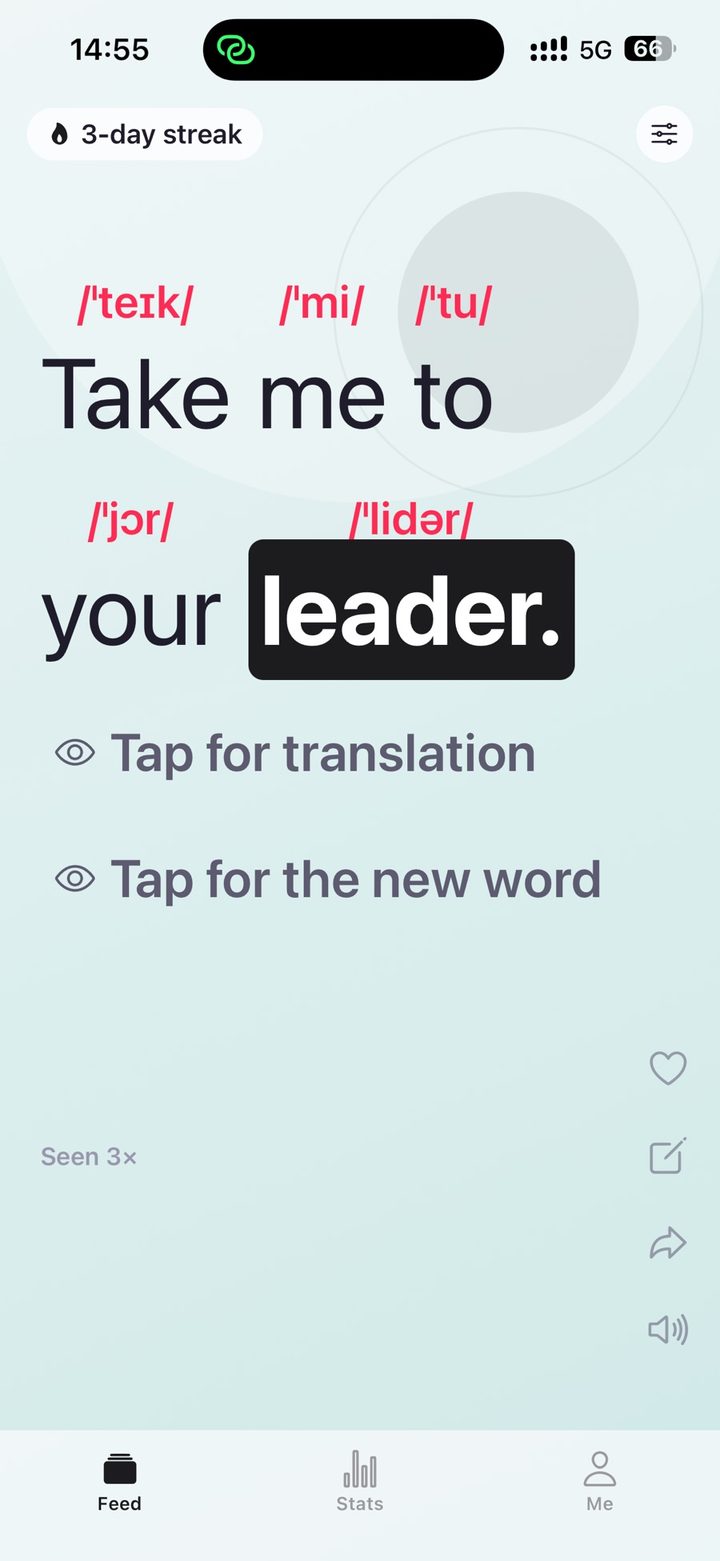
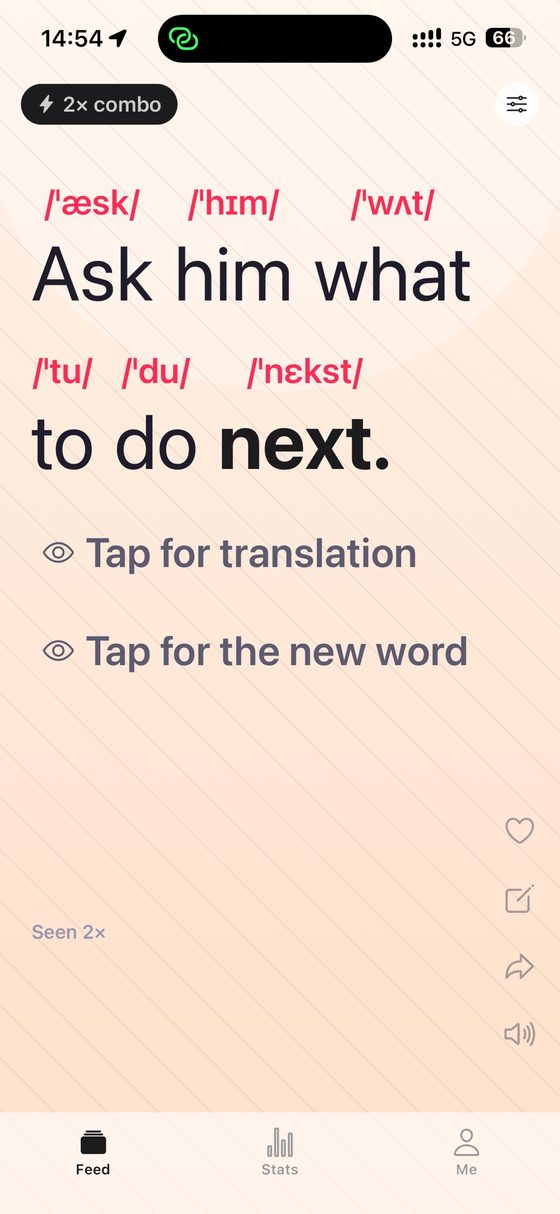
One card, one sentence, one word you have not met.
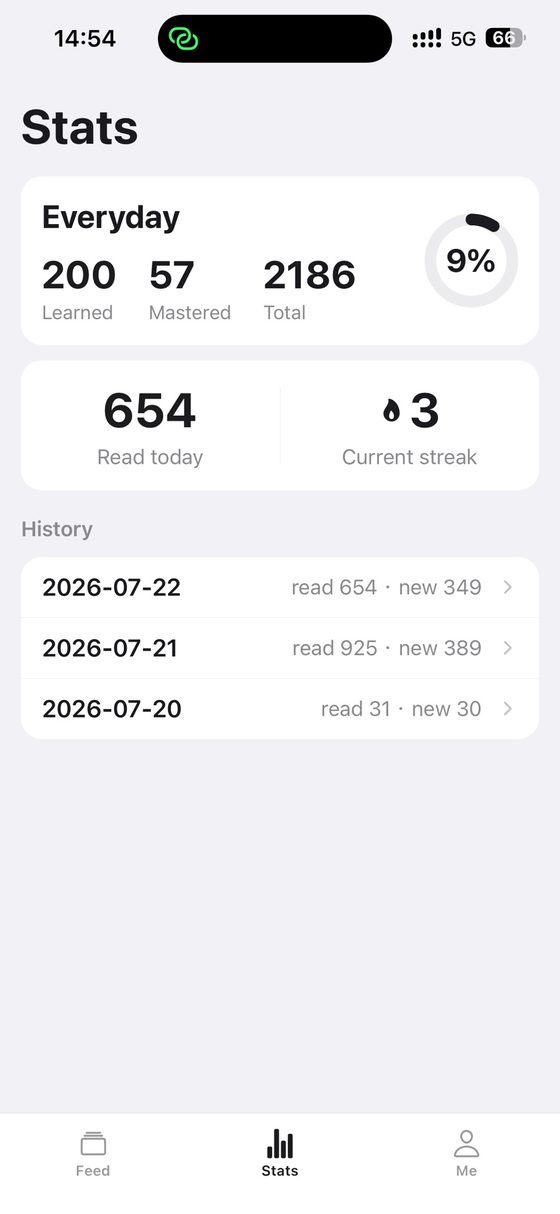
Stats: the list you are working through, today, and the days behind you.
What you actually get
Sentences you can already read
Every card is a short sentence in which exactly one word is new to you. That is the i+1 idea from second-language research, made literal: comprehensible input plus one step. Because you understand the rest, you can guess before you check, and a word you guessed at and then confirmed is a word you keep. It also means you are never reading a wall of unknowns, which is the state most people mistake for "I am bad at English".
Tap once for the word, twice for the sentence
Tap any word and you get its IPA transcription and its definition. Tap again and the translation of the whole sentence appears. The order matters: the word first, then the sentence, so the translation confirms what you worked out rather than replacing the work. Nothing is revealed until you ask for it.
Hear it, in a word or in full
Any single word can be read aloud, and so can the whole sentence. The voice is your device’s own built-in speech, which is why it works with the network off and why it sounds like the rest of your phone rather than like a recording studio somebody rented.
The library is on your phone
The sentences and words ship inside the app rather than streaming from a server. Underground, on a plane, in a country where your data plan has given up: you open it and it works. This is not a cached-last-session trick — ordinary reading and review need no network connection at all.
Definitions in your language, or in easier English
Definitions and sentence translations are available in ten languages. If you set the app to English, you do not get nothing: you get plain-English learner definitions instead, which is the setting to graduate to when translating has started to slow you down.
Word lists for the thing you are actually doing
Everyday, Phrasal Verbs & Set Expressions, Gaokao, CET-4, CET-6, Postgraduate, IELTS, TOEFL, GRE, and Business. Pick the one that matches the exam or the job in front of you, and the sentences come from it. All ten are available on the free tier — the list you need is not the thing being sold to you.
Today's Story
At the end of a session, Lexi writes a short English text about what you actually read that day, built around the words you met, and finishes it with a line of encouragement. It is generated, not filed away in advance, which is why it can be about your day. Any story can be turned into a poster to share, in one of five styles picked at random.
A streak, a week, and a receipt
A running streak, a chart of the last seven days, and a day-by-day history of every word you have met, so a claim like "I did nothing this week" can be checked instead of believed. The stats screen also shows, per word list, how much of it you have learned and how much has stuck.
Favourites, notes, and the door out
Star a word, write yourself a note on it, and find it again later. Your data imports and exports, so what you have built is yours to move. Everything else lives in an on-device database and goes away when the app does.
Made to be read from
Reading backgrounds, typography options, and light and dark themes — because this is an app you are meant to look at for ten minutes at a time, not a form you fill in. The reading surface changes; the sentence in front of you does not move.
How to use it without wasting the first week
There is no setup wizard and nothing to configure before you start. There is, however, a way to use this badly, so here is the way that works.
Set the definition language, oncePick the language you want meanings in, out of the ten. If your English is already decent, try the plain-English learner definitions instead — the first day feels slower and the second week does not.
Choose the list that matches your deadlineIELTS in March means the IELTS list, not Everyday. Business English for work means Business. The lists are all free, so there is no reason to be on the wrong one.
Read the sentence before you tap anythingThis is the whole discipline of the app. The sentence is built so that you can nearly get there. Tapping first turns a reading exercise into a flashcard, which is the thing that did not work for you last time.
Tap the word first, the translation secondWhen you cannot get it, take the IPA and the definition and re-read the sentence. Only reveal the full translation if it still will not come. That order is doing the work.
Read the story at the endToday’s Story puts the day’s new words back into a paragraph you have not seen, which is the cheapest review there is: you meet each word a second time, in a different sentence, on the same day.
Ten minutes is a real session. The free tier is thirty sentences a day, which is roughly that — it is a shape, not a teaser.
What leaves your phone, and what does not
There is no account. No sign-up, no email address, no password — you install the app and read. That is not a privacy slogan, it is how the app is built: your progress, your favourites, your notes, your saved sentences and your settings live in a database on the device, and the word and sentence library ships inside the app itself.
Two features do send data, and only when you use them. The daily story sends the words you studied that day with their definitions, that day’s counts, your interface language and your local date. AI example sentences send the one word you asked about and your interface language. Both are forwarded to an AI provider to write the text you asked for; they are not used to build a profile and are not sold or shared for advertising.
To attach a usage quota to a device and keep the AI features from being abused, the app opens an anonymous session with our backend the first time you use one. It is a random identifier held on your device, not an account: there is nothing in it that identifies you.
If you buy Lexi Pro, Apple handles the payment and RevenueCat verifies the entitlement. We never see your payment details.
There are no advertising SDKs in the app, no advertising identifier, and no App Tracking Transparency prompt — because there is nothing to ask you for. Speech is your device’s own text-to-speech, and sharing goes through the standard share sheet, which means both are on your phone and both start when you press something.
Deleting the app removes everything stored locally. If you also want the anonymous session and its quota records removed from the server, email us and we will do it.
Free, and what Pro adds
Free gives you thirty sentences a day, every word list, every dictionary language, and three daily stories, with no account. That is a complete way to use the app: nothing about the method is behind the wall, and the lists people would most expect to be sold separately — IELTS, TOEFL, GRE, CET — are not.
Lexi Pro comes as a yearly subscription or a one-time lifetime purchase, and adds the daily cap being lifted, more story summaries per day, AI-written example sentences for any word, all reading backgrounds, font sizes and themes, automatic read-aloud of whole sentences, word-by-word phonetics across the sentence, and backup and transfer of your data.
Subscriptions renew automatically unless cancelled at least 24 hours before the period ends, and can be managed or cancelled at any time in your App Store account settings. Prices are whatever the App Store shows in your country, so none is printed here.
What is not here: adverts, a data-selling business, and a free tier that expires.
No. There is no sign-up, no email and no password. The privacy policy says the same thing, and it is why the app can be useful ninety seconds after you install it.
Does it work with no signal?
Yes, for reading. The sentence and word library is inside the app, so sentences, definitions, IPA and speech all work offline. The two AI features — the daily story and AI example sentences — need a connection, because they are generated on request.
How does it know which word is new to me?
It keeps track of the words you have already met. The stats screen shows, for each word list, how many words you have learned, how many have stuck, and the total, plus a dated history of what you read each day — and the next sentence is chosen against that record.
Is the audio a recording or synthesised?
Synthesised, by your own device. Lexi uses the built-in text-to-speech that iOS already has, for single words and for whole sentences. That is why it works offline.
Which word lists are included?
Everyday, Phrasal Verbs & Set Expressions, Gaokao, CET-4, CET-6, Postgraduate, IELTS, TOEFL, GRE and Business. All of them, on the free tier.
Is this for absolute beginners?
Not really. It is built for people who recognise plenty of English words but freeze in front of real sentences, which is a different problem from having no vocabulary at all. If you cannot read a simple sentence yet, the one-new-word idea has nothing to stand on.
What is the difference between yearly and lifetime?
Yearly is a subscription that renews automatically unless you cancel at least 24 hours before the period ends. Lifetime is a single purchase that does not renew. Both unlock the same things.
Can I get my words and notes out?
Yes — the app imports and exports your data. Deleting the app removes everything held on the device.
Is there an Android or web version?
No. Lexi runs on iPhone and iPad, on a Mac with Apple silicon, and on Apple Vision Pro.